Mark Return as Filed
Stratus allows you to manually mark a return as filed when the return was filed outside of the e-file process. This provides a visual indicator in the navigation tree and helps maintain an accurate record of the return's filing status.
How to Mark a Return as Filed
- Right-click on the return in the navigation tree.
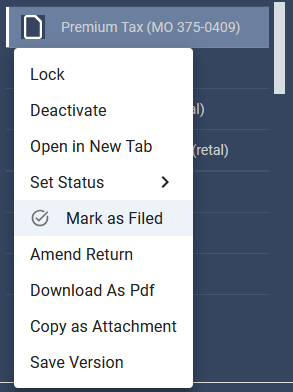
- Select Mark as Filed.
- This option is separate from Mark as E-filed.
- A blue checkmark will appear on the return icon to indicate that the return has been filed. The filing status will also be recorded in Stratus.

- The action will be recorded in the Actions Report (under Summary Schedules), including the user who marked the return as filed and the corresponding date and time.

Note: The Mark as Filed option is intended for returns that were not electronically filed through the software.
Related Articles
Was this helpful?